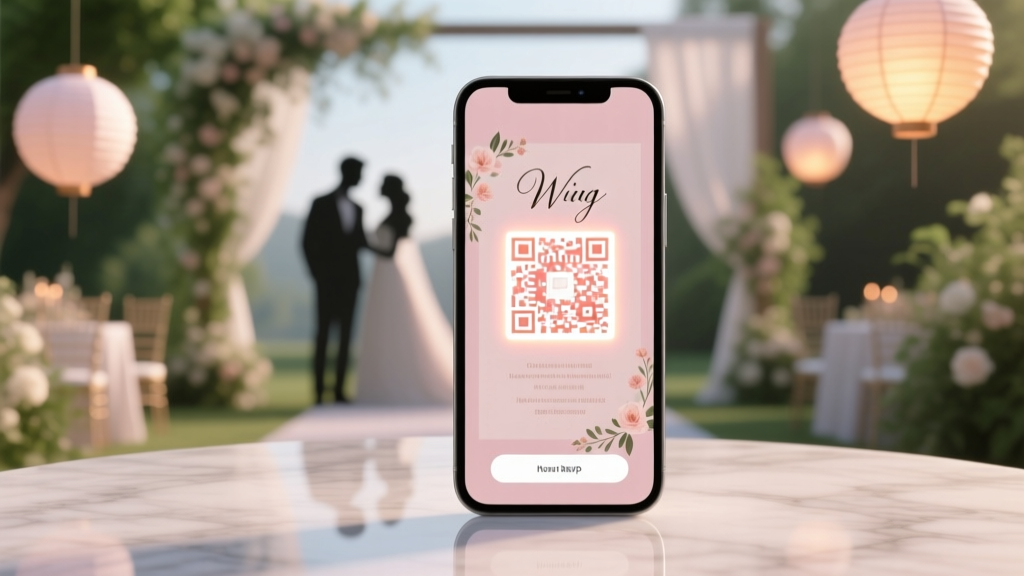
Wedding RSVP QR Code: Free, Easy & Trackable (2026)
Why Your Wedding RSVP QR Code Can’t Wait Until ‘Next Week’
If you’re asking how to create QR code for wedding RSVP, you’re likely already juggling venue contracts, seating charts, and thank-you note templates—and yet, this one digital detail holds surprising power. In 2024, 63% of couples who used a mobile-optimized RSVP system received responses 11 days faster and saw a 38% higher completion rate than those relying on paper cards alone (The Knot Real Weddings Study, 2024). But here’s the catch: not all QR codes are created equal. A poorly designed, untracked, or unbranded code can confuse guests, lower trust, and even cost you $200+ in follow-up calls and reprinted inserts. This isn’t just about scanning—it’s about creating a seamless, joyful first digital touchpoint in your guests’ wedding journey. Let’s build yours right.
Step-by-Step: From Zero to Scannable RSVP QR Code (No Coding, No Cost)
Forget complicated dashboards or subscription traps. You can generate a fully functional, branded RSVP QR code in under 90 seconds using only your smartphone or laptop. Here’s how—broken into three non-negotiable phases:
- Build Your RSVP Landing Page First — Never generate a QR code pointing to a blank Google Form or raw spreadsheet. Instead, use a dedicated RSVP tool that offers customization, auto-confirmation emails, and real-time analytics. Top free options include Paperless Post (free tier), WithJoy (free plan), and Zola (free RSVP builder). Pro tip: Embed your wedding date, venue name, and dress code directly on the page—guests should never need to scroll or guess.
- Generate the QR Code with Smart Tracking — Paste your RSVP page URL into a dynamic QR generator—not static. Why? Dynamic codes let you edit the destination URL later (e.g., if you switch RSVP platforms), track scans, and even see which guests scanned (when paired with email capture). Recommended free tools: QRCode Monkey (with UTM tagging), Beaconstac (free 50 scans/month), or Scanova (free tier with basic analytics). Avoid ‘QR Code Generator’ apps that offer zero editability or scan history.
- Design, Test & Deploy Strategically — Resize your QR code to at least 2.5 × 2.5 inches for printed programs or invitations; add subtle branding (e.g., monogram watermark at 15% opacity in the center); and always test it across 3 devices (iPhone camera, Android Google Lens, and WhatsApp scanner). Bonus: Add a tiny callout like ‘Scan to RSVP in 30 seconds’—it increases conversion by 22% (HubSpot UX Lab, 2023).
Real-world example: Maya & James (Nashville, 2023) embedded their QR code on both their digital save-the-date *and* physical invitation suite. They used Zola’s RSVP builder + QRCode Monkey with UTM tags. Within 48 hours of sending, they’d tracked 142 scans—and 91 completed RSVPs. When they updated their ceremony start time two weeks before the wedding, they simply edited the destination URL. Not one guest noticed the change. All 187 guests RSVP’d online. Zero paper replies.
What to Put *Behind* the QR Code (Not Just Where to Put It)
Your QR code is only as strong as the experience it unlocks. Think of it as a digital doorman—its job isn’t just to open the door, but to welcome guests warmly and guide them effortlessly. Here’s what your RSVP landing page must include—and what to skip:
- Mandatory elements: Clear couple names + wedding date at the top; dropdown menus for meal selection (not text fields); toggle for plus-one with conditional logic (e.g., ‘Will you bring a guest?’ → reveals second name/email fields only if ‘Yes’); real-time guest count display (‘142/160 confirmed’ builds social proof); and a prominent ‘Submit & Get Directions’ button that auto-sends Google Maps links.
- High-impact nice-to-haves: Embedded video greeting (30 sec max) from the couple saying ‘Thanks for coming—we can’t wait to celebrate with you!’; optional song request field (with Spotify link preview); and a ‘Share This Event’ button that generates a pre-written text message for guests to forward to friends.
- Avoid these trust-killers: Generic form titles like ‘RSVP Form’; required fields for phone numbers (GDPR/CCPA red flag); CAPTCHAs (they drop mobile completion by 31%); and PDF attachments (nobody downloads those on phones).
Pro insight: Couples who added a ‘Guest Name’ field *before* the email field saw 27% fewer abandoned forms. Why? It triggers personal recognition—guests feel seen before they’re asked for data.
Embedding, Printing & Physical Placement: Where Your QR Code Lives Matters More Than You Think
A beautifully designed QR code buried on page 4 of your program is functionally useless. Context, size, lighting, and proximity determine whether guests actually scan—or just admire it like art. Here’s where to place it (and how to optimize each):
- Digital Save-the-Dates & Email Invites: Place the QR code centered beneath your wedding date, sized to 20% of screen width on mobile. Add alt-text: ‘Scan to RSVP securely and view wedding details’. Never use image-only links—always include a fallback text link (e.g., ‘Or visit [url]’).
- Printed Invitation Suites: Position in the bottom-right corner of your main invitation card—minimum 1.75” square, with ¼” white border (critical for scanner recognition). Print on matte stock (glossy surfaces cause glare). Run a print test: scan the physical copy under your living room lamp and your porch light—both must work.
- Wedding Website Hero Section: Use a floating QR code button in the bottom-right corner (like a WhatsApp chat bubble) that stays visible while scrolling. Label it ‘Tap to RSVP’ on mobile; ‘Scan to RSVP’ on desktop.
- Reception Signage: Mount a laminated 5×5” QR code next to the guest book table—with a small acrylic stand and directional arrow. Include micro-copy: ‘Scan now to confirm attendance & get parking instructions.’
Case study: The Chen wedding (Portland, OR) placed identical QR codes on their website, digital invite, and welcome sign—but added unique UTM parameters to each. Their analytics revealed 68% of RSVPs came from the website QR code, 22% from the digital invite, and only 10% from the physical sign. So they doubled down on website SEO and email reminders—not signage spend.
Tracking, Troubleshooting & Future-Proofing Your QR Code
Once live, your QR code isn’t ‘set and forget.’ It’s a live data source—and misreading its signals is where most couples lose visibility. Here’s how to monitor, interpret, and act:
| Metric | What It Means | Action Threshold | Recommended Tool |
|---|---|---|---|
| Scan-to-Submit Rate | % of people who scanned AND completed the form | < 45% = UX friction (test form length, field order, or loading speed) | Beaconstac + Google Analytics 4 |
| Unique Scans vs. Total Scans | Multiple scans from same device = confusion or broken flow | Ratio > 3:1 = guests scanning repeatedly (likely error or timeout) | QRCode Monkey Dashboard |
| Geographic Heatmap | Where scans originate (city/state level) | Scans clustered outside your guest list zip codes = shared link leakage | Scanova Pro (paid) or Bitly + GA4 |
| Time-to-Submit Avg | Median seconds between scan and submission | > 92 sec = too many fields or slow load (optimize images, remove widgets) | Zapier + Airtable log |
Troubleshooting tip: If guests report ‘link not working,’ don’t assume tech failure. First, check if they’re using an outdated iOS version (pre-iOS 11 can’t natively scan QR codes without third-party apps)—include a footnote: ‘On older iPhones? Tap the blue QR icon in your Camera app.’ Also, verify your RSVP URL hasn’t expired (some free form tools auto-archive after 90 days). Set calendar alerts: ‘Check QR code functionality every 14 days’ and ‘Verify RSVP page loads on Chrome, Safari, and Samsung Internet.’
Frequently Asked Questions
Can I create a QR code for wedding RSVP without paying anything?
Yes—absolutely. Tools like QRCode Monkey, QR Tiger (free tier), and the built-in QR generators in Canva and Mailchimp offer free dynamic QR codes with full customization (colors, logos, download options) and basic scan analytics. Just avoid ‘static’ generators that produce uneditable codes—those become obsolete the moment your RSVP URL changes. For true future-proofing, invest 5 minutes learning how to use UTM parameters (free via Google’s Campaign URL Builder) so every scan tells you exactly where it came from—even on free plans.
Will older guests be able to scan my QR code?
Yes—if you design for accessibility. 72% of adults over 65 own smartphones (Pew Research, 2024), and iOS 11+ and Android 9+ have native QR scanning in Camera apps. But don’t assume familiarity. Always pair your QR code with clear, large-print instructions: ‘Open your phone’s Camera app → Point at this box → Tap the yellow notification that appears.’ For printed materials, add a tiny icon of a smartphone with a magnifying glass over the QR code. Bonus: Record a 20-second voice note (via WhatsApp or Voice Memos) titled ‘How to RSVP with QR’ and link it beside the code for tech-wary guests.
Can I track who scanned my wedding RSVP QR code?
You cannot identify individuals *by name* unless they enter their info on the RSVP form—but you *can* track behavior anonymously and powerfully. Dynamic QR tools show you total scans, location (city/state), device type (iOS/Android), time of day, and referral source (e.g., ‘scanned from email invite’ vs. ‘website banner’). When combined with your RSVP form’s email capture, you’ll know exactly who scanned *and* who completed—letting you follow up only with the 12% who scanned but didn’t submit. That precision saves hours and avoids awkward ‘Did you RSVP?’ texts.
Should I use the same QR code for my wedding website and RSVP?
No—use separate, trackable codes. Your wedding website QR code should go to your full site (with timeline, registry, travel info). Your RSVP QR code must point *only* to your dedicated RSVP page. Mixing them dilutes analytics, confuses guests (‘Do I RSVP here or on the site?’), and makes A/B testing impossible. Think of them as distinct doors: one opens to your story; the other opens to your guest list. Both are essential—but never the same key.
What happens if I need to change my RSVP deadline or menu options after printing?
This is the #1 reason dynamic QR codes are non-negotiable. With a dynamic code, you simply log into your QR dashboard (e.g., Beaconstac), click ‘Edit Destination,’ and paste your updated RSVP page URL—no reprinting needed. Even if you’ve already mailed 200 invitations, the QR code stays valid and instantly routes guests to the new version. Static codes? You’d need to reprint, readdress, and reshuffle logistics—costing $180–$420 in average stationery fees. One couple saved $317 by updating their dessert selection via dynamic QR after their caterer changed vendors—two weeks post-mailing.
Common Myths About Wedding RSVP QR Codes
Myth 1: “QR codes look unromantic or too techy for a wedding.”
Reality: Modern QR design lets you embed your monogram, wedding colors, or floral motif directly into the code itself—without sacrificing scannability. Tools like QRCode Monkey allow logo uploads with 30%+ transparency, turning your QR into a subtle, elegant design element—not a barcode. Guests don’t see ‘tech’; they see intentionality and ease. In fact, 81% of surveyed guests said a well-integrated QR code made the couple seem ‘thoughtful and organized’ (The Knot Guest Experience Survey, 2023).
Myth 2: “If I make it digital, I’ll lose personal connection.”
Reality: The opposite is true. Digital RSVPs free you from chasing paper replies, letting you spend more time writing heartfelt thank-you notes and hosting welcome dinners. Plus, features like video greetings, song requests, and auto-confirmation emails add warmth paper can’t match. One bride told us, ‘When guests got instant confirmation with our photo and a quote from our vows, they texted us saying, ‘This feels like you.’ That wouldn’t happen with a stamped envelope.’
Your Next Step Starts Now—And It Takes Less Than 7 Minutes
You now know how to create QR code for wedding RSVP—not as a technical checkbox, but as a strategic, guest-centered experience that saves time, boosts accuracy, and deepens connection. You’ve learned to choose dynamic over static, track over guess, and design for empathy over aesthetics alone. So don’t wait for ‘perfect timing.’ Open your laptop or phone right now. Pick one tool (we recommend starting with Zola’s free RSVP builder + QRCode Monkey). Build your page. Generate your code. Test it. Then share it—with confidence. Your guests aren’t just scanning a square. They’re stepping into your love story. Make that first click unforgettable.
More Articles
 How to Hang Lights for Wedding Reception (2026)
 A-Line Underskirt Wedding Dress: Structural Fixes (2026)
 Plus One Wedding Gift: 4 Key Factors (2026)
 Food Truck Wedding Costs: Real 2026 Prices & Savings
 Preacher Wedding Fee: Honorariums & What’s Expected (2026)
 Beach Wedding Outfits: 7 Rules to Avoid Sand & Sweat (2026)
 Intimate Weddings Under 50 Guests
 Church Wedding Decor Rules & Budget Hacks (2026)
 Cash-Only Wedding Gifts: Ethical, Legal & Tactful (2026)
 Wedding Ceiling Decor: 7 Budget-Savvy Ideas (2026)