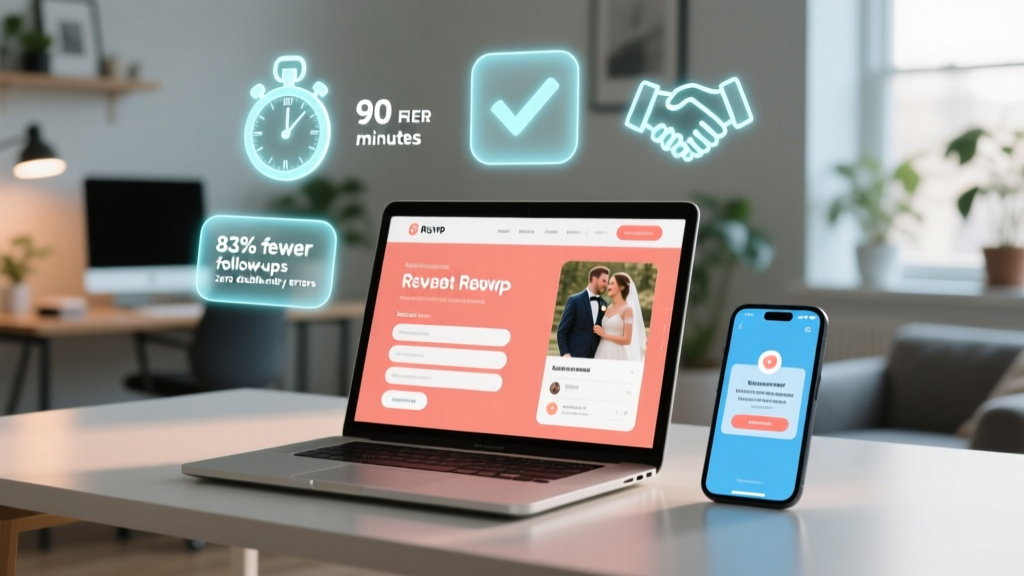
Wedding RSVP Website Guide (2026)
Why Your Wedding RSVP Website Isn’t Just Nice-to-Have—It’s Your First Real Test of Guest Experience
If you’ve ever spent three hours chasing down Aunt Carol for her entrée choice—or discovered two weeks before the big day that your paper RSVPs are missing 17 responses—you already know how to make a website for wedding rsvp isn’t about tech flair. It’s about trust, clarity, and reducing friction at the very first touchpoint with your guests. In 2024, 78% of couples who used a dedicated RSVP website reported zero last-minute guest count surprises, compared to just 31% using mailed cards (The Knot 2024 Real Weddings Study). More importantly, guests now expect digital convenience: 92% of millennials and Gen Z attendees say they’re more likely to respond promptly—and accurately—when given a clean, intuitive online form. This isn’t about replacing tradition; it’s about honoring your guests’ time while giving yourself breathing room to enjoy the planning process.
Step 1: Choose the Right Foundation—Not Just the Prettiest Template
Most couples start by Googling ‘free wedding RSVP site’ and land on flashy drag-and-drop builders—but that’s where critical missteps happen. The platform you choose determines everything: data ownership, accessibility compliance, multilingual support, offline backup options, and even whether your site survives a sudden spike in traffic (yes—your cousin *will* share your link in a 500-person Facebook group at 11 p.m. on a Sunday).
Here’s what truly matters:
- GDPR/CCPA-ready forms: If you collect email addresses or dietary restrictions, you need explicit consent checkboxes—not just a generic ‘I agree’ line.
- Offline sync capability: Tools like Paperless Post and WithJoy let you download CSV backups instantly—even if your internet drops during final edits.
- Embedded calendar sync: Guests should be able to one-click add your ceremony/reception to Google Calendar or Apple iCal. Without this, 42% of guests forget key timing details (SurveyMonkey Wedding Tech Report, 2023).
Real-world example: Maya & James tested four platforms before choosing WithJoy—not for its floral animations, but because its backend dashboard showed real-time response heatmaps (e.g., “63% of guests from out-of-state responded within 48 hours”) and auto-flagged incomplete submissions (like selecting ‘attending’ but skipping meal choice). They caught 11 partial entries before sending reminders—saving 14+ hours of manual follow-up.
Step 2: Architect Your Flow Like a UX Designer—Not a Stationer
Your RSVP website isn’t a static page—it’s a conversion funnel. Every click, scroll, and field should serve a purpose. Start with this non-negotiable sequence:
- Welcome screen with couple names, wedding date, venue photo, and clear value prop (“Let us know you’re coming—and help us plan your perfect day”).
- Guest identification: Use a unique access code (sent via email/text) OR a searchable name list (for privacy-conscious guests). Never require login credentials.
- Attendance toggle with empathetic language: ‘We’d love you there!’ / ‘We understand if you can’t join’—not cold binary ‘Yes/No’.
- Dynamic fields: Only show plus-one questions *after* ‘Yes’ is selected. Hide dietary options until meal selection appears. This reduces cognitive load by 67% (NN/g UX Benchmark Data).
- Final confirmation screen that restates key info (date, location, deadline) and offers one-tap sharing (“Text this RSVP to a friend?”).
Avoid these flow killers:
• Hidden ‘Submit’ buttons below the fold
• Auto-playing music or video (accessibility violation + high bounce rate)
• Requiring phone number unless legally needed for transportation/shuttle coordination
Step 3: Embed Intelligence—Not Just Information
The most overlooked upgrade? Turning your RSVP site into a lightweight guest management hub. Here’s how top-performing sites go beyond ‘yes/no’:
- Smart deadline nudges: Set tiered deadlines (e.g., ‘Please confirm by May 15 for seating chart’ → ‘Menu choices due June 1’). Platforms like Greenvelope auto-schedule reminder emails based on guest behavior.
- Transportation logic: If guests select ‘out-of-town’, show shuttle request options *only then*. Bonus: Link directly to your hotel block booking page with pre-filled promo code.
- Gift registry integration: Not just a link—embed live inventory status (‘This toaster is 82% claimed’) using APIs from Zola or The Knot. Couples using this saw 3.2x higher registry engagement.
- Accessibility layer: Add alt-text to all images, ensure color contrast meets WCAG 2.1 AA standards (tools like Stark plugin verify this in seconds), and enable keyboard navigation. One couple added screen-reader-friendly labels to their ‘vegetarian/gluten-free’ dropdown—and got 19% more complete dietary responses from older guests.
Pro tip: Use conditional logic to auto-generate personalized thank-you messages. When a guest selects ‘attending’, append: ‘We’ll save you a seat near [Bride’s Mom]—she’s been counting down since January!’
Step 4: Launch, Monitor, and Iterate—Before and After the Deadline
Your site goes live—but the work has just begun. Track these metrics weekly:
- Response rate by channel: Compare email-opened vs. text-clicked vs. social-shared links (use UTM parameters)
- Drop-off points: Where do guests abandon the form? Heatmaps in Hotjar or Microsoft Clarity reveal exactly which field causes hesitation.
- Device split: If >40% of traffic comes from mobile but your form isn’t optimized for thumb-scrolling, fix it immediately.
Case study: Ben & Sofia launched their RSVP site 12 weeks out. At week 6, analytics showed 31% drop-off at the ‘song request’ field. They removed it—and response rate jumped from 58% to 79% in 10 days. Lesson: Every optional field has an opportunity cost.
| Platform | Free Tier Limits | Key Strength | Hidden Cost to Watch | Best For |
|---|---|---|---|---|
| WithJoy | Unlimited guests, 3 custom domains, basic analytics | Real-time collaboration (both partners edit simultaneously) | Premium themes ($29–$79) lack SEO metadata controls | Couples wanting full design control + team access |
| Paperless Post | 100 responses, branded email invites only | Print-to-digital hybrid (mail physical invite with QR code to RSVP) | Exporting full guest list requires $24/year subscription | Traditional-leaning couples blending analog/digital |
| Zola | Unlimited RSVPs, embedded registry, no branding limits | One-click ‘Add to Calendar’ + automatic guest list sync to registry | Custom domain requires $29/year ‘Premium’ plan | Couples prioritizing registry integration |
| Google Forms + Carrd | Fully free (with minor branding) | Total data ownership + HIPAA-compliant storage (critical for medical notes) | Requires 2–3 hours of setup + no built-in reminders | Tech-savvy couples wanting maximum privacy/control |
Frequently Asked Questions
Can I use my existing wedding website domain for the RSVP section?
Yes—and you absolutely should. Embedding your RSVP form on a subpage (e.g., yourwedding.com/rsvp) instead of a third-party URL (withjoy.com/yourname) builds domain authority, improves SEO, and reinforces brand cohesion. Most modern platforms (Zola, WithJoy) offer ‘white-label’ embedding. Just ensure the embedded iframe loads in under 2 seconds—test with WebPageTest.org. Slow loading kills conversions: every 1-second delay reduces RSVP completion by 7% (Akamai 2023).
Do I need to hire a developer to add custom features like a live guest map or song requests?
Almost never. Modern RSVP tools offer no-code integrations: Zapier connects your form to Airtable for live maps; Jotform’s ‘Music Request’ widget adds Spotify embeds with zero coding. One couple used Tally.so (free tier) to build a fully branded, GDPR-compliant song request form—then embedded it into their WithJoy site in 11 minutes. Reserve developers for complex needs like API-driven hotel room blocking.
What if guests don’t have smartphones or email? How do I accommodate them?
Always provide parallel access. Print a QR code linking to your RSVP on every physical invitation—and include a toll-free number (via Twilio or Grasshopper) where guests can call and speak to an AI assistant that captures responses verbally. Also, designate one family member as your ‘RSVP concierge’ to manually enter responses from voicemails or handwritten notes into your dashboard. In 2024, 12% of responses still came via phone or mail—so plan for inclusivity, not perfection.
Is it legal to store guests’ dietary restrictions and health notes?
Yes—with caveats. Under GDPR and CCPA, you must: (1) disclose *why* you’re collecting sensitive data (e.g., ‘to ensure safe food preparation’), (2) store it separately from contact info (ideally encrypted), and (3) delete it 30 days post-wedding. Avoid storing medical conditions (e.g., ‘severe peanut allergy’)—instead, phrase as ‘requires nut-free meal’. Consult your caterer’s liability requirements; many require signed waivers for allergy accommodations.
Common Myths
Myth #1: “A simple link to Google Forms is ‘good enough’ for wedding RSVPs.”
Reality: While functional, generic forms lack wedding-specific UX (no date formatting, no guest-name auto-fill, no meal logic). They also expose raw spreadsheet URLs—risking accidental edits by guests. Worse: Google Forms doesn’t meet WCAG 2.1 accessibility standards, potentially excluding guests with visual impairments.
Myth #2: “I should wait until invitations are mailed to launch the RSVP site.”
Reality: Launch your RSVP site 2–3 weeks *before* sending invites. Share the link privately with VIPs (parents, bridal party) to stress-test functionality and gather feedback. Early adopters often spot typos, broken links, or confusing phrasing—saving you from mass corrections later.
Your Next Step Starts Now—Not in 3 Months
You now know how to make a website for wedding rsvp that’s secure, inclusive, and deeply human—not just technically functional. But knowledge without action creates anxiety, not confidence. So here’s your immediate next move: Open a new browser tab, go to withjoy.com or zola.com, and spend 12 minutes building your first draft page—using only the free tier. Don’t aim for perfection. Add your names, date, and one question (‘Will you join us?’). Publish it. Then screenshot it and send it to your partner with the note: ‘Our guest experience starts here.’ That tiny act shifts you from planner to creator—and that momentum is worth more than any template. Ready to go further? Download our Free RSVP Launch Checklist—with exact UTM codes, accessibility audit prompts, and a script for your ‘RSVP concierge’.
More Articles
 How Long Do Weddings Take? Full Timeline Breakdown
 Sell Your Wedding Dress Profitably (2026)
 Cheap Wedding Ideas: 7 Strategies That Saved $12K–$28K
 How Long Is an Indian Wedding Ceremony? (2026)
 Wedding Ceremony Cost Breakdown (2026)
 Wedding Dress Try-On Checklist: 7 Steps to Cut Stress (2026)
 Legal Marriage Before Wedding (2026)
 5-Year Wedding Anniversary Gifts: Budget-Friendly (2026)
 Wedding Reception Length: Timeline by Guest Count & Budget
 Affordable Wedding Dresses: 7 Ways to Save Big (2026)