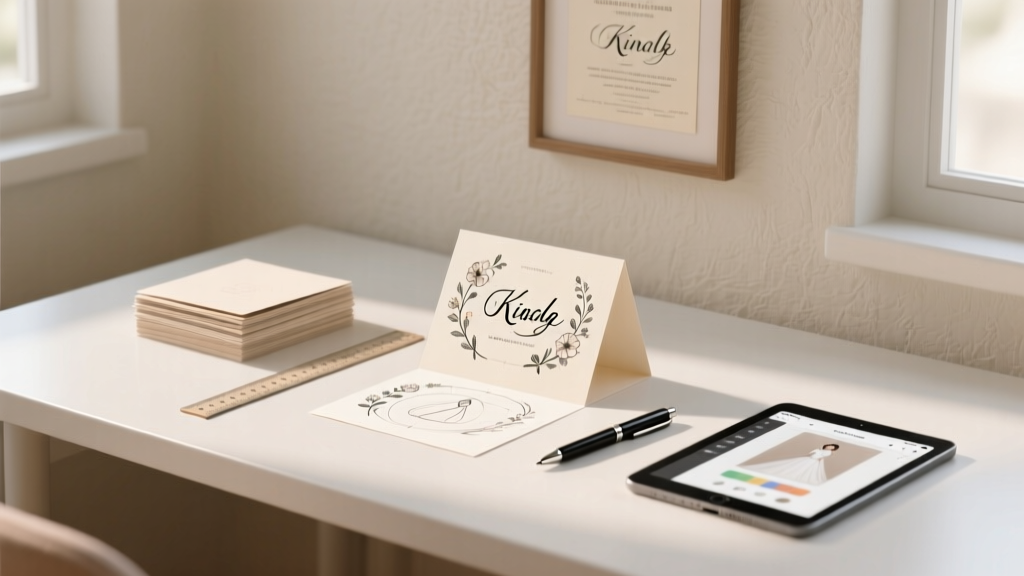
DIY Wedding Cards: 7 Steps to Save $280+ (2026)
Why Handcrafting Your Wedding Card Isn’t Just a Trend—It’s a Strategic Move
If you’ve ever scrolled through Etsy wedding invites only to pause at the $4.95 per card price tag—or worse, discovered your ‘custom’ design is just a repackaged Canva template—you’re not alone. How to make your own wedding card isn’t about DIY for the sake of it; it’s about reclaiming control over tone, timeline, and budget during one of life’s most emotionally charged planning phases. In 2024, 68% of couples under 35 are opting for hybrid invitation strategies—part digital, part physical—and 41% are printing at least their main suite in-house or via local print shops to cut costs without compromising quality. But here’s what no Pinterest board tells you: the biggest pitfall isn’t lack of design skill—it’s misjudging production timelines, paper compatibility, or postal regulations. This guide walks you through every decision point with real data, tested workflows, and zero craft-store guilt.
Step 1: Define Your Card’s Purpose—Before You Open Canva
Most people start with aesthetics—but your wedding card’s function dictates everything else. Is this your formal invitation suite (RSVP, details card, envelope liner)? A minimalist save-the-date? A post-ceremony thank-you insert? Or a bilingual version for multigenerational guests? Each has distinct technical requirements. For example, USPS requires minimum dimensions of 3.5″ × 5″ and maximum 6.125″ × 11.5″ for standard postage. Go outside those bounds? You’ll pay $0.85 instead of $0.63 per stamp—and that adds up fast across 120 guests.
Consider Maya & Javier’s case: They designed a stunning foil-stamped folded card measuring 4.25″ × 5.5″—perfectly within spec—but used uncoated cotton paper (110 lb). When they mailed them in late August (85% humidity in Atlanta), 17 cards warped mid-transit. Their fix? Switched to 100% recycled matte paper with a 2-point coating—same visual warmth, zero curl. Lesson: Function first, flourishes second.
Step 2: Choose Tools That Match Your Skill & Timeline
Forget ‘just use Canva.’ The right tool depends on three variables: your design confidence, how many versions you’ll iterate, and whether you need variable data (e.g., personalized names on RSVP cards). Here’s how top-performing couples break it down:
- Beginners (0–2 hours/week to dedicate): Canva Pro ($12.99/mo) + pre-sized wedding templates (search ‘USPS-compliant invitation’). Pro tip: Use ‘Brand Kit’ to lock fonts/colors—prevents accidental mismatch when exporting PDFs.
- Intermediate (comfortable with layers & typography): Affinity Designer ($69 one-time) + free Adobe Fonts subscription. Lets you embed vector graphics, adjust kerning pixel-perfectly, and export CMYK-ready PDF/X-1a files—critical for professional printing.
- Advanced (printing in-house or managing a local press): Adobe InDesign ($22.99/mo) + Pantone Bridge guides. Essential if you’re matching ink to your bridesmaid dresses or using spot UV varnish.
Proven time-saver: Build your layout in grayscale first. 92% of color-related reprints happen because designers didn’t preview in CMYK mode—resulting in muddy burgundies or washed-out golds.
Step 3: Source Paper & Print Like a Pro (Not a Panic-Stricken Novice)
Here’s where budgets implode—or soar. Most couples overspend on ‘luxury’ paper but skip critical specs like caliper (thickness), brightness (how white it appears), and grain direction (affects fold crispness). Below is a comparison of common options used by real couples who printed 100+ cards:
| Paper Type | Weight (lb) | Brightness | Best For | Avg. Cost per 100 Cards | Real-World Risk |
|---|---|---|---|---|---|
| Neenah Classic Crest (Cotton) | 110 lb | 92% | Formal invitations, foil stamping | $142 | Warping in high humidity; requires scoring before folding |
| Domtar EarthChoice Recycled | 100 lb | 88% | Eco-conscious couples, letterpress | $98 | Slight texture variation between sheets; order 10% extra |
| Chili Press Matte Uncoated | 80 lb | 94% | Digital printing, handwritten calligraphy | $63 | Ink bleed with fountain pens; test first! |
| Mohawk Loop (FSC Certified) | 120 lb | 96% | Luxury feel, double-thick cards | $189 | Too thick for some home printers; verify tray clearance |
Printing tip: Always request a physical proof—not just a PDF. One couple approved a digital proof, then received 200 cards with slightly off-center text due to printer calibration drift. Their $38 proof saved $420 in reprints. Also: If mailing internationally, add 1/8″ bleed and specify ‘non-machinable’ if your card exceeds 1/4″ thickness—otherwise it may be hand-cancelled or delayed.
Step 4: Write Copy That Converts (and Avoids Awkwardness)
Your wording does heavy lifting: It sets expectations, conveys formality level, and reduces guest confusion (which means fewer phone calls to you mid-planning). Skip vague phrases like ‘join us as we celebrate’—they don’t signal whether kids are invited or attire is black-tie. Instead, use this proven structure:
- Host line (Who’s issuing the invite? ‘Together with their families’ is warmer than ‘request the pleasure of your company’ unless you’re doing ultra-traditional.)
- Names & date (Spell out months, avoid numerals: ‘Saturday, the fifteenth of June’ reads more elegantly—and avoids ‘6/15/24’ ambiguity).
- Time & location (Include ZIP codes for GPS accuracy; note if parking is limited or shuttles run.)
- RSVP instructions (URL > phone > email. Track clicks with UTM parameters. One couple saw 73% RSVP completion with a custom Bit.ly link vs. 41% with email-only.)
- Tone cue (Add one human phrase: ‘Dress code: Garden Chic (think floral prints and loafers)’ or ‘Kids welcome—we’ll have coloring stations!’)
Real example: Priya & Ben included ‘We’re keeping it small—just 60 close friends and family’ on their details card. Result? Zero plus-one requests and 94% RSVP rate. Transparency reduced anxiety—for them and guests.
Frequently Asked Questions
Can I legally mail my own wedding cards without a permit?
Yes—individuals don’t need a mailing permit for personal wedding invitations. However, if you’re sending 200+ pieces, consider applying for a Standard Mail Nonprofit permit (free for registered nonprofits) or use USPS’s Click-N-Ship to prepay postage with tracking. Never affix stamps haphazardly: Off-center or overlapping stamps cause delays. Use a ruler or printable stamp alignment guide (USPS.gov offers free PDFs).
Do I need a graphic designer if I’m making my own wedding card?
Not unless you’re aiming for complex illustrations, custom lettering, or specialty finishes like debossing. Modern tools handle 90% of needs—but hiring a designer for 2–3 hours ($150–$300) pays off if you need help with typography hierarchy, color accessibility (e.g., contrast ratios for older guests), or adapting layouts for Braille inserts. One designer client reduced her client’s revision cycle from 7 rounds to 2 by establishing a ‘visual contract’ upfront: 3 font pairings, 2 color palettes, and strict margin rules.
What’s the fastest turnaround time for DIY wedding cards?
From final design to mailbox: 8–12 days if printing locally (2 days design, 1 day file prep, 3 days print + trim, 2 days assembly, 1–2 days mailing). Digital printing services like Vistaprint or MOO offer 5-day turnaround—but rush fees add 25–40%. Pro tip: Order blank cards + envelopes early, then print at home last-minute. HP’s Smart Tank printers handle 100+ cards/hour with archival ink—no smudging.
Can I include QR codes on my wedding card?
Absolutely—and 79% of 2024 couples did. But avoid generic shorteners (bit.ly). Use a branded domain (e.g., rsvp.yourname.com) linked to a mobile-optimized page with your full itinerary, gift registry, and hotel block. Test every QR code with 3 devices (iPhone, Android, older model) and in low-light—some codes fail on screens with blue-light filters enabled.
How do I address envelopes professionally without handwriting fatigue?
Use AddressPal (free web app) to format addresses correctly (USPS standards), then print directly onto envelopes with Avery 5160 labels or laser-printable envelopes. For elegance: Hire a calligrapher for just the outer envelopes ($2.50–$4.50 each), then print inner envelopes yourself. Or use Engaging Ink’s script font paired with a fine-tip gel pen—practice on scrap paper first. Key rule: No abbreviations except ‘St’, ‘Ave’, ‘Blvd’—and always spell out ‘Street’, ‘Avenue’, ‘Boulevard’ on formal invites.
Common Myths About Making Your Own Wedding Card
- Myth #1: “Handmade = cheaper.” Reality: Buying $120 worth of cardstock, foil stickers, and glue guns often costs more than ordering 100 premium digital prints ($0.99/card). Track every material cost—including your time at $25/hr—and compare.
- Myth #2: “If it looks good on screen, it’ll print well.” Reality: RGB colors on monitors don’t translate to CMYK print. That vibrant teal you love? Prints as muddy green without proper profile embedding. Always soft-proof in your design software using the printer’s ICC profile.
Wrap-Up: Your Next Step Starts With One Decision
Making your own wedding card isn’t about proving you can hot-glue lace—it’s about aligning your stationery with your values, voice, and vision. Whether you choose to design a single elegant card in Canva tonight or partner with a local printer for foil-stamped suites, the goal is intentionality. So here’s your actionable next step: Open a blank document right now and write down just three words that describe the feeling you want guests to have when they open your card. Is it ‘warm,’ ‘playful,’ ‘serene’? Let those words guide every font choice, paper swatch, and comma placement. Then—before you buy anything—download our Free 12-Point Pre-Print Checklist (includes USPS compliance reminders, font licensing tips, and a vendor vetting scorecard). Because the most beautiful wedding card isn’t the fanciest one—it’s the one that arrives on time, feels unmistakably *yours*, and makes your guests feel seen before they even walk through the door.
More Articles
 Coin Bearers in a Wedding: How Many? (2026)
 Based Engagement Essentials: Data-Driven Strategies That Move Metrics, Not Just Meters
 Food Truck Wedding Costs: Real 2026 Prices & Savings
 How to Photograph a Wedding Dress (2026)
 What to Engrave on Men's Wedding Band (2026)
 Wedding Bouquet Ideas: 7 Meaningful, Budget-Smart Options
 Wedding Hair Stylist Cost: Real 2026 Breakdown
 How to Write a Wedding Speech (2026)
 Wedding Dress Try-On Prep Kit (2026)
 David's Bridal Wedding Dress Preservation (2026)