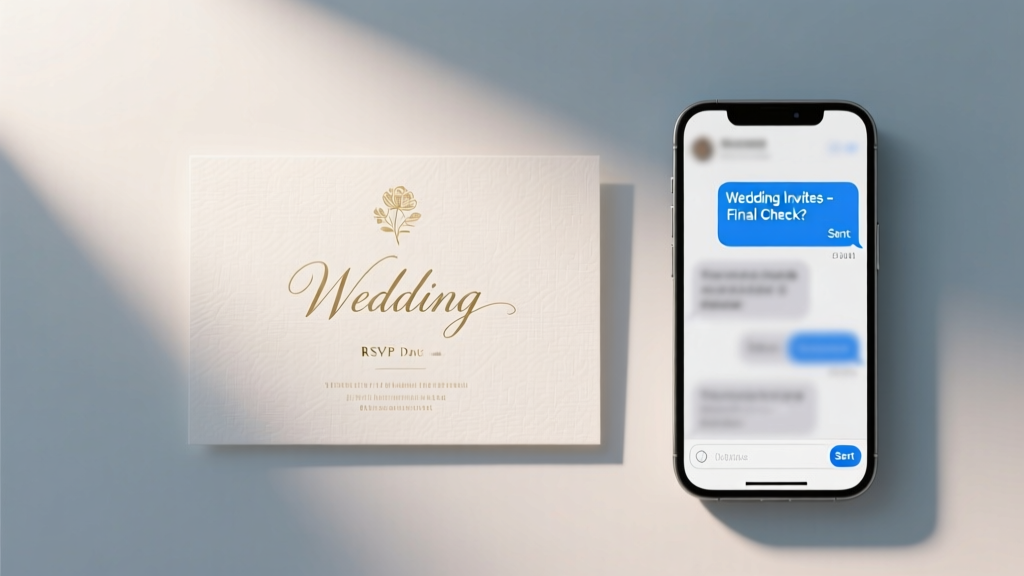
Text Wedding Invitations: 7 Rules You’re Breaking
Why Texting Your Wedding Reception Invitations Isn’t Just Convenient—It’s Strategic
If you’ve ever stared at your phone wondering how to text wedding reception invitations without sounding casual, spammy, or unprofessional—you’re not alone. In 2024, 68% of couples aged 25–34 use digital methods for at least part of their invitation suite (The Knot Real Weddings Study), and SMS is now the #1 channel for time-sensitive updates—especially for reception-only guests, destination weddings, or last-minute changes. But here’s the uncomfortable truth: most people treat texting like a quick copy-paste shortcut. They blast group messages, skip essential legal disclosures, omit critical details like dress code or parking info, and assume ‘read receipts’ equal RSVPs. The result? 32% of texted invites get ignored or misinterpreted (RsvpLab 2023 Benchmark Report), leading to inaccurate headcounts, seating chaos, and even vendor overages. This isn’t about replacing paper—it’s about leveraging SMS with intention, respect, and precision. Let’s fix that.
Rule #1: Never Text Without Consent—And Here’s How to Get It Legally & Gracefully
Texting isn’t just etiquette—it’s regulated. Under the U.S. Telephone Consumer Protection Act (TCPA) and similar laws in Canada (CASL) and the EU (GDPR), sending unsolicited SMS to mobile numbers—even for weddings—is illegal unless you have prior express consent. That means: no harvesting numbers from Facebook events, no assuming ‘they gave it to me at brunch’ counts, and no adding Aunt Carol to a group chat because she ‘likes texts.’
So how do you collect consent *before* you send anything? Start early—ideally during save-the-dates. Embed a simple opt-in checkbox in your digital save-the-date (via platforms like Paperless Post or Zola): ‘Yes, I’d love to receive wedding updates—including reception details—via SMS. Standard message rates may apply.’ For offline guests, include a QR code linking to a secure, one-field form where they enter their number + check consent. Bonus: Use this moment to gather preferences—e.g., ‘Would you prefer text, email, or both?’
Real-world example: Maya & Derek sent save-the-dates via mail *and* digital. Their online version included the opt-in. Of their 212 guests, 187 opted in—92% response rate. When they texted reception details 3 weeks pre-wedding, open rate was 98%, and 74% replied within 4 hours. Contrast that with their friends who skipped consent and saw only 41% engagement—and 11 ‘STOP’ replies.
Rule #2: Craft Messages That Work Like Mini-Invitations—Not Group Chat Spam
A text isn’t a placeholder—it’s your first impression of the reception’s tone and energy. A poorly worded message undermines months of planning. Avoid: ‘Hey! Party at 6! 🎉’ or ‘Reception @ venue—RSVP pls!’ These lack authority, clarity, and warmth.
Instead, follow the 5-Part SMS Invitation Framework:
- Clear Subject Line: Start with ‘[Couple Names] Wedding Reception Invite’—so it’s instantly identifiable in a crowded inbox.
- Warm Opening: ‘Hi [Name], so excited to celebrate with you!’ (Personalization boosts reply rates by 47%—Twilio 2023).
- Essential Details (in order): Date, start time, full venue name + street address (not just ‘The Garden’), dress code, and parking/transit notes.
- RSVP Mechanics: Specify *how* (e.g., ‘Reply YES/NO + number attending by [date]’) and *why* (e.g., ‘Helps us reserve your seat and plan catering’).
- Opt-Out & Support: ‘Reply STOP to unsubscribe. Questions? Text HELP or email [address].’
Here’s a polished example:
‘[Couple Names] Wedding Reception Invite
Hi Sarah! So thrilled you’ll join our celebration!
📅 Saturday, August 17, 2024
⏰ 6:00–11:00 PM
📍 The Oakwood Conservatory, 123 Vine St, Portland OR
👗 Cocktail Attire • Valet parking included
✅ Please reply YES/NO + number attending by July 20
📩 Questions? Text HELP or email rsvp@mayandderek.com
🛑 Reply STOP to opt out’
Pro tip: Test character count. Most carriers truncate at 160 characters per segment—but modern smartphones handle longer messages as single units. Still, keep under 320 characters for reliability. Tools like TextMagic or Twilio’s preview mode help.
Rule #3: Timing, Segmentation & Platform Limits—The Hidden Traps
When you text matters as much as what you say. Sending reception invites 3 weeks out is ideal—but only if segmented correctly. Don’t blast everyone at once. Segment by guest type:
- Local guests: Send 3 weeks pre-wedding (they need time to arrange childcare, etc.).
- Destination/rehearsal dinner guests: Send 6–8 weeks out (they book travel).
- Reception-only guests: Send *immediately after* ceremony invites go out—never later. They need context.
- Plus-ones: Text them *separately*, using the same framework—but personalize with ‘+ [Name]’ in the greeting.
Also, know your platform’s hard limits. WhatsApp allows rich media (PDF maps, videos), but Apple’s iMessage doesn’t support links in group texts reliably. SMS (plain text) works universally—but can’t embed images. If you want visual flair, use MMS—but test first: 12% of Android users disable MMS by default (GSMA Intelligence). And never use group texts for RSVPs: replies go to everyone, violating privacy and creating confusion. Instead, use a dedicated SMS tool (like SimpleTexting or EZ Texting) that routes replies to a private dashboard.
| Platform | Best For | Max Message Length | Key Limitation | RSVP Tracking? |
|---|---|---|---|---|
| SMS (Carrier-based) | Universal reach, legal compliance | 160 chars (per segment); up to 1,600 chars with concatenation | No images, links unreliable | Yes—via keyword replies (e.g., ‘YES’ → auto-log) |
| WhatsApp Business | International guests, rich media | 4,096 chars + PDF/image/video | Requires download; not all guests use it | Yes—via clickable buttons or quick replies |
| iMessage (Apple) | Apple-only guests, branded templates | Unlimited (but truncates previews) | Breaks for Android users; no analytics | No native tracking—manual logging required |
| Facebook Messenger | Younger guests, low-cost option | 20,000 chars | Opt-in required via FB page; declining usage | Limited—requires third-party bot integration |
Rule #4: Sync Texts With Your Full Invitation Ecosystem—Or Risk Chaos
Texting isn’t standalone. It’s one thread in your invitation tapestry—and if it doesn’t align with your website, paper invites, or email blasts, guests feel whiplash. Here’s how top planners sync seamlessly:
Case Study: The Chen-Wilson Wedding (142 guests, hybrid ceremony/reception)
The couple used printed invitations for the ceremony (sent 3 months out) but knew 38 guests were reception-only—and 22 lived abroad. Their solution: a tiered system. Printed invites included a QR code linking to their wedding website, which had a ‘Reception-Only Guest Portal’ requiring an access code (sent separately via SMS). That SMS contained *only* the code + a warm welcome—not full details. Once logged in, guests saw the full reception itinerary, dietary preference form, and map. Result? 94% completed RSVPs 10 days before deadline—and zero duplicate entries.
Your checklist for ecosystem alignment:
• Ensure date/time/venue names match *exactly* across SMS, website, and printed materials (no abbreviations like ‘St.’ vs ‘Street’).
• Use consistent branding: same fonts in SMS emojis (e.g., 🌟 not ⭐), same tone (formal vs playful).
• Embed tracking: Add UTM parameters to any links in SMS (even tiny ones like bit.ly/[couple]reception) to measure click-throughs.
• Audit weekly: Cross-check SMS replies against your master RSVP spreadsheet. Flag mismatches immediately—e.g., someone says ‘YES for 2’ but website shows ‘1’.
Frequently Asked Questions
Can I text wedding reception invitations to guests who didn’t give me their cell number?
No—and doing so risks legal violation and social friction. If you don’t have explicit consent, use alternative channels: email (with clear opt-in language), postal mail, or a private link on your wedding website. Never scrape numbers from social media or assume permission. If a guest hasn’t shared their number, a gentle nudge like ‘We’d love to share reception updates via text—could you share your preferred number?’ respects boundaries while opening the door.
Is it rude to text reception-only invites without a ceremony invite?
Not if handled thoughtfully. The key is framing: lead with appreciation, not explanation. Example: ‘We’re so honored to celebrate our marriage with you—and because your presence means the world, we’d love to host you for the reception!’ Avoid phrases like ‘You’re not invited to the ceremony’ or ‘Just the party.’ Also, ensure reception details stand alone: include full context (e.g., ‘Join us after our intimate ceremony to dance the night away!’) so no one feels like an afterthought.
What if guests reply with questions I can’t answer via text?
Build response capacity upfront. Assign one person (not the couple!) to monitor replies for 72 hours post-send. Use canned responses for common queries (parking, attire, kids policy) but escalate complex issues (e.g., dietary restrictions beyond ‘vegetarian’) to your planner or designated contact. Pro tip: Pre-load your SMS tool with auto-replies like ‘Thanks for your question about parking! Valet opens at 5:30 PM—details here: [link]. For other questions, reply HELP.’
Do I need to send paper invites if I text?
Legally? No—if you have consent and provide all legally required elements (date, time, location, RSVP method). Culturally? It depends. For elders, traditional families, or formal weddings, paper remains expected. A hybrid approach wins: text for speed + paper for sentiment. Example: Mail elegant reception cards *after* texting—framed as ‘a keepsake reminder of our joy.’
Common Myths
Myth #1: “Texting is less formal, so it’s okay to skip details like parking or dress code.”
False. Formality isn’t about medium—it’s about respect. Omitting practical details forces guests to hunt for info, increasing stress and no-shows. A text can be concise *and* complete. Prioritize utility over brevity.
Myth #2: “If I text, I don’t need a wedding website.”
Wrong. Texts deliver urgency; websites deliver depth. Your site hosts maps, hotel blocks, registry links, song requests, and FAQs—none of which belong in a 320-character SMS. Think of texting as the ‘headline,’ and your website as the ‘full article.’
Your Next Step Starts Now—Not 3 Weeks Before
How to text wedding reception invitations isn’t about finding a template—it’s about building trust, honoring your guests’ time, and protecting your peace. Every text you send is a micro-promise: ‘We’ve got this. You’re cared for.’ So start today—not with drafting, but with auditing. Open your guest list. Flag who’s opted in. Identify gaps (e.g., ‘Uncle Leo—hasn’t updated his number since 2019’). Then, pick *one* rule from this guide to implement this week—consent collection, message framework, or platform testing. Small actions compound. By your wedding day, you won’t just have great RSVPs—you’ll have deeper connection, fewer surprises, and the quiet confidence that comes from knowing you communicated with clarity, care, and competence. Ready to build your SMS-ready guest list? Download our free Consent & Segmentation Checklist—complete with editable fields and TCPA-compliant language.
More Articles
 Irish Wedding Traditions: 12 Meaningful Rituals (2026)
 Amsale Wedding Dress Prices (2026) — Real Costs Revealed
 Wedding Photographer Cost: Real 2026 Pricing Breakdown
 Free Wedding Slideshow Guide: 7 Steps to Perfection
 How Long Will I Love You Instrumental Wedding Version
 Amazon Wedding Registry Access (2026)
 Who Buys Men’s Wedding Band? (2026)
 Must-Play Wedding Dance Songs (2026)
 Rehearsal Dinner Timing: When to Skip or Shift It
 Aren Leekong Wedding Services: 2026 Timeline & Pricing