# How to Make a Wedding Album Look Professional: 12 Expert Tips
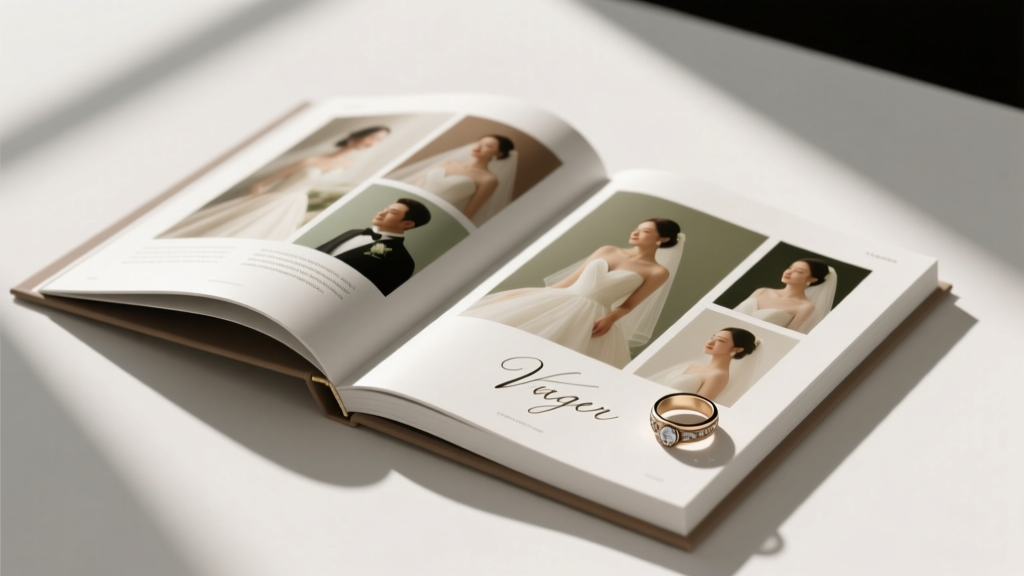
Your wedding photos deserve better than a dusty hard drive. A professionally crafted wedding album becomes a family heirloom — something your grandchildren will hold in their hands decades from now. Yet most couples either overspend on albums they could DIY or underspend and regret the quality. Here's exactly how to bridge that gap.
## 1. Curate Ruthlessly Before You Design
The biggest mistake couples make is including too many photos. Professional album designers follow the **10% rule**: from a 600-image gallery, select 60–80 images maximum.
- **Lead with emotion, not chronology.** Your cover spread should be your single most powerful image — not necessarily the first photo of the day.
- **Tell a story arc:** getting ready → ceremony → portraits → reception → send-off. Each section should have a clear opener, middle, and closer.
- **Cut duplicates ruthlessly.** If you have 12 nearly identical kissing photos, keep one.
- Use tools like Lightroom's star-rating system or Google Photos to flag selects before importing into your album software.
## 2. Choose the Right Album Software and Layout Principles
Professional results start with professional tools. The top platforms used by wedding photographers include:
| Software | Best For | Price |
|---|---|---|
| Fundy Designer | Auto-layout + print integration | ~$199/yr |
| SmartAlbums | Speed + photographer workflow | ~$150/yr |
| Canva Pro | Budget DIY with templates | ~$15/mo |
| Adobe InDesign | Full creative control | Adobe CC plan |
**Layout rules that separate amateur from professional:**
- Maintain consistent margins (0.25" minimum from bleed edge)
- Use **odd-number groupings** — 1, 3, or 5 images per spread feel more natural than even numbers
- Let full-bleed spreads breathe — don't crowd them with text or borders
- Align images to an invisible grid; misaligned photos signal amateur work instantly
## 3. Print Quality Is Everything — Don't Cut Corners Here
A stunning layout printed on cheap paper looks worse than a mediocre layout on premium stock. Professional album printers used by photographers include **Artifact Uprising**, **WHCC**, **Millers Lab**, and **GraphiStudio**.
Key specs to request:
- **Paper:** Lay-flat binding with lustre or matte finish (avoid glossy — it shows fingerprints and glare)
- **Cover:** Linen, leather, or acrylic options all read as premium; avoid faux leather
- **Size:** 10×10" or 12×12" are the industry standard for full-size albums; 8×8" for parent albums
- **Resolution:** Export images at 300 DPI minimum — anything lower will appear soft in print
Budget reality: a quality 20-spread album from a professional printer runs $150–$400 for the print itself. Factor this into your planning.
## 4. Color Consistency and Editing Cohesion
Nothing breaks the professional feel of an album faster than photos that don't match each other tonally.
- **Edit all album selects in one session** using a consistent preset or grade
- Aim for a unified color temperature — mixing warm golden-hour shots with cool indoor flash shots on the same spread looks jarring
- Convert a small number of images to **black and white intentionally** — emotional moments (first look, vows, tears) often work beautifully in B&W and add visual variety
- Check your spreads in both screen preview and a printed proof before ordering the final album
## Common Mistakes (And the Myths Behind Them)
**Myth #1: More photos = more value.**
Reality: Overcrowded albums dilute impact. A 40-spread album with 3 images per spread (120 photos total) will always feel more luxurious and intentional than a 40-spread album crammed with 300 photos. White space is not wasted space — it's what makes each image feel important.
**Myth #2: You need to be a designer to get professional results.**
Reality: Modern album software like Fundy or SmartAlbums uses AI-assisted auto-layout that places images according to professional design principles automatically. You can produce a photographer-quality album in an afternoon by starting with auto-layout and making targeted adjustments — no design degree required.
## Conclusion
A professional wedding album isn't about having the most expensive photographer or the fanciest software — it's about intentional curation, consistent editing, quality printing, and disciplined layout. Follow these principles and you'll create something that genuinely looks like it came from a high-end studio.
Ready to start? Pull your top 80 photos today, download a free trial of Canva Pro or SmartAlbums, and build your first draft spread. Your future self — and your future grandchildren — will thank you.
 DIY Wedding Flowers: Stunning & Budget-Friendly
 Rustic Wedding Centerpieces on a Budget (DIY Ideas)
 How to Make Wax Seal Invitations
 DIY Wedding Centerpieces: Step-by-Step Guide
 Best DIY Projects to Combat Wear and Extend the Life of Your Home’s High-Traffic Surfaces
 DIY Wedding Arch
 DIY Wedding Centerpieces on a Budget (2026)
 How to Decorate a Cross for a Wedding Without Overspending
 How To Choose the Perfect Anniversary Gift: A Practical, Thoughtful, and Budget-Savvy Guide
 Themes, Tools, and Checklists: A Practical Framework for Smarter DIY Projects