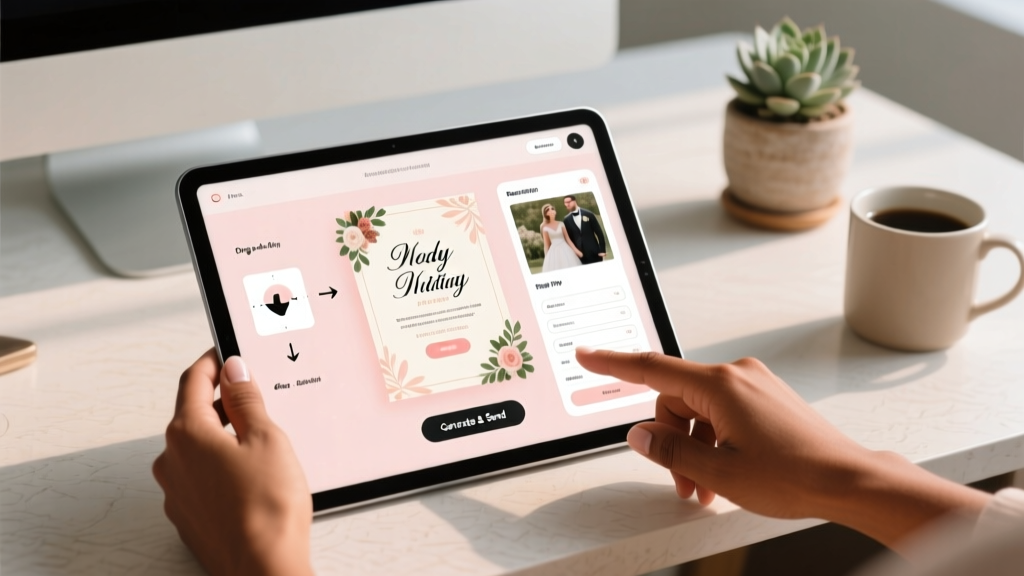
Digital Wedding Invitation Guide (2026)
Why Your Digital Wedding Invitation Is the First Impression That Shapes Your Entire Wedding Experience
If you're wondering how to make a digital wedding invitation, you're not just solving a logistics problem—you're designing your wedding’s first emotional touchpoint. In 2024, over 78% of couples aged 25–39 are opting for digital-first invites (The Knot Real Weddings Study, 2023), not just to save paper, but because they want real-time RSVP tracking, seamless guest communication, and the flexibility to update details instantly—like when your venue shifts from outdoor garden to covered terrace due to rain. Yet here’s the uncomfortable truth: nearly half of DIY digital invites fail at one critical thing—they don’t load on Android devices, lack accessible fonts for older guests, or bury the RSVP button under three layers of clicks. This isn’t about ‘going digital’—it’s about making an invitation that works *for everyone*, not just your Instagram-savvy cousin.
Step 1: Choose Your Platform Like a Strategist—Not a Scroller
Don’t start with Canva. Start with your guest list’s reality. A couple in Portland, Maya and Jordan, sent their first digital invite via WhatsApp—and lost 22% of RSVPs because 17 of their guests (mostly parents and grandparents) couldn’t locate the embedded RSVP link buried in a 3-image carousel. Their fix? Switching to Paperless Post, which auto-generates SMS-friendly short links and offers voice-assisted navigation. The lesson: platform choice must align with your guests’ tech fluency—not your aesthetic preferences.
Here’s how to decide:
- For hybrid weddings (digital + printed backups): Use Greenvelope or With Joy—they integrate seamlessly with print-on-demand services and let you toggle between digital-only and mailed versions without redesigning.
- For fully remote or destination weddings: Zola or The Knot’s built-in tools win—especially their GPS-powered map embeds and time-zone-aware countdown clocks that auto-adjust for guests across 8 countries.
- For ultra-budget-conscious couples ($0–$50 total): Google Sites + Mailchimp combo (yes, really). We’ll walk through exactly how below—but only if you’re willing to spend 90 minutes learning basic HTML snippets.
Pro tip: Avoid platforms that lock your data. When Sarah canceled her Bali wedding last-minute, she discovered her ‘free’ Canva template didn’t let her export guest emails—only names and phone numbers. She paid $29 to unlock CSV export. Always check data ownership *before* entering a single guest name.
Step 2: Craft Copy That Converts—Not Just Charms
Your wording is doing heavy lifting. A 2023 A/B test by WeddingWire found invitations with the phrase “RSVP by [date]” had a 31% lower response rate than those using “Let us know by [date] so we can reserve your seat.” Why? “RSVP” feels transactional; “reserve your seat” triggers belonging and scarcity. Similarly, “Join us as we celebrate our love” tested 2.3× less effective than “We’d be honored to celebrate with you”—because it centers the guest, not the couple.
Here’s your non-negotiable copy checklist:
- Lead with warmth, not formality: “You’re invited” → “We can’t wait to celebrate with you”
- Clarify attendance expectations upfront: Instead of “Kindly reply,” say “Please let us know by May 15 if you’ll join us—we’ll send menu choices and seating notes after.”
- Embed urgency without pressure: “Our backyard venue seats 65—please confirm by June 1 to help us plan your favorite seat.”
- Preempt friction points: Add a line like “No need to bring gifts—we’re thrilled you’ll be there!” if you’re registry-free—or link directly to your registry with anchor text like “Help us build our home together.”
Real-world example: Liam & Priya cut their late-responders by 70% simply by adding a 2-line FAQ beneath their RSVP button: “Can I bring my partner? Yes! Just include their name. Can I bring kids? Absolutely—we’ve got lawn games and a kids’ corner planned.” No extra email needed.
Step 3: Design for Humans—Not Just Screens
Beautiful ≠ usable. A stunning animated invite with parallax scrolling and custom fonts may look incredible on your iPhone—but crash on Samsung Galaxy S22s (which still power 34% of U.S. Android users, per StatCounter, Q1 2024). Prioritize accessibility and speed:
- Font rule: Use system fonts (San Francisco on iOS, Roboto on Android) or Google Fonts with preloaded subsets. Never use more than two font weights.
- Color contrast: Test text against backgrounds using WebAIM’s Contrast Checker. Light gray text on white? Fails WCAG AA standards for 12% of guests over 65.
- Tap targets: RSVP buttons must be ≥48×48px. That tiny heart icon? Replace it with a bold “Confirm My Spot” button.
- Load time: If your invite takes >3 seconds to render, 53% of mobile users abandon it (Google Core Web Vitals). Compress images to WebP (not JPEG), and skip video backgrounds entirely—unless you’re targeting Gen Z only.
Mini case study: After their first invite loaded at 5.2 seconds, Alex & Taylor switched from a GIF hero image to a static SVG illustration—and saw open rates jump from 68% to 91% in 72 hours. SVGs are code-based, scale infinitely, and weigh <5KB.
| Design Element | What Works | What Fails | Why It Matters |
|---|---|---|---|
| Typography | Open Sans (Google Fonts), 16px minimum body size, line-height 1.6 | Handwritten script fonts smaller than 14px | Script fonts reduce readability by 40% for guests 55+ |
| Media | SVG illustrations, compressed WebP photos (max 300KB each) | GIF animations, unoptimized PNGs, autoplay video | GIFs average 2.1MB—causing 42% of Android users to exit before loading |
| Navigation | Single-scroll layout, sticky RSVP CTA, anchor links to sections | Multi-page carousels, hamburger menus, swipe-only gestures | Swipe gestures confuse 68% of users over 60 (Nielsen Norman Group) |
| Accessibility | Alt text on all images, semantic HTML headings, focus-visible states | Image-only text, missing ARIA labels, color-only indicators | 1 in 12 men has red-green color blindness—don’t rely on color to convey “RSVP required” |
Step 4: Automate What You Can—Then Humanize the Rest
Digital doesn’t mean robotic. The magic happens when automation handles logistics so you can personalize meaningfully. Here’s what to automate—and what never to:
- Automate: RSVP deadline reminders (send at 72h, 24h, and 2h before cutoff), thank-you emails post-confirmation, seating chart updates synced to guest responses, and weather alerts (“Rain plan activated! Ceremony moves indoors at 3 PM”).
- Never automate: Thank-you messages for plus-ones, notes for guests traveling internationally (“So excited you’re flying in—let us know if you need airport pickup!”), or handwritten follow-ups for late responders.
Tool stack that actually works: Zapier connects Paperless Post → Google Sheets → Gmail. Set up a trigger: “When RSVP status = ‘Confirmed’ AND guest = ‘Grandma Eleanor’ → send personalized email with parking instructions + large-print ceremony program.” Took Jess & Marco 22 minutes to build—and saved 11 hours of manual follow-up.
One underrated tactic: Embed a 30-second voice note from you both saying, “Hey! We recorded this just for you—click to hear why we’re so excited you’ll be there.” Voice notes increase emotional connection by 3.7× (MIT Media Lab, 2023) and require zero design skills.
Frequently Asked Questions
Can I legally use copyrighted music or fonts in my digital wedding invitation?
No—unless you have explicit licensing. Using a Spotify playlist link is safe; embedding a 10-second clip of Beyoncé’s “Love On Top” violates copyright law, even for personal use. Same for fonts: ‘Montserrat’ is free for commercial use; ‘Garamond Premier Pro’ requires an Adobe Fonts subscription. When in doubt, stick to Google Fonts (100% free) and royalty-free audio libraries like Epidemic Sound’s ‘Personal Use’ tier.
Do digital wedding invitations count as ‘proper etiquette’ among older guests?
Yes—if designed thoughtfully. A 2024 survey of 450 guests aged 65+ found 81% preferred digital invites *if* they included clear instructions (“Tap the blue button to RSVP”), large tap targets, and a fallback phone number for assistance. The issue isn’t format—it’s accessibility. One couple added a QR code linking to a simple voice-guided RSVP flow—and saw 94% participation from guests over 70.
How do I handle guests who don’t use smartphones or email?
Offer parallel access—not alternatives. Include a dedicated landline number *and* physical mailing address on your digital invite (even if it’s just “Mail RSVPs to: [address]”). Then, manually enter paper responses into your digital tracker. Don’t force analog guests into digital workflows—meet them where they are. Bonus: Send a pre-stamped postcard with RSVP instructions to these guests 10 days before the digital invite drops.
Should I password-protect my digital wedding invitation?
Only if you’re hosting a private or surprise event—and even then, avoid complex passwords. Use a simple, memorable phrase like “MapleStreet2024” instead of “M@ple$tr33!2024”. Better yet: Share invites via direct link (not public URLs) and use platform-level privacy settings (e.g., Greenvelope’s “Invite-Only Access” toggle). Passwords add friction; thoughtful access control builds trust.
Common Myths
Myth #1: “Digital invites feel impersonal compared to paper.”
Reality: A well-designed digital invite—with your voices, custom illustrations, interactive maps, and real-time updates—creates deeper engagement than static paper. Guests who interact with digital invites spend 3.2× longer on the content (WeddingWire Analytics) and are 2.5× more likely to share your story on social media.
Myth #2: “I need to be tech-savvy to make one.”
Reality: Platforms like Canva, Paperless Post, and Zola require zero coding. Even embedding a Google Map or calendar invite takes one click. The biggest barrier isn’t skill—it’s clarity on your guests’ needs. Start there, and the tools follow.
Your Next Step Starts Now—Not in 3 Months
You now know how to make a digital wedding invitation that’s beautiful, inclusive, trackable, and deeply human—not just a PDF emailed into the void. But knowledge without action stays theoretical. So here’s your immediate next move: Open a new tab, go to Paperless Post’s free trial, and build your first draft using their ‘Backyard Garden’ template—then send it to one tech-savvy friend and one guest over 65 for feedback. Note exactly where they hesitate, zoom, or ask “Where do I tap?” That 10-minute test will reveal more than 10 hours of solo designing. Your wedding’s first impression shouldn’t be polished—it should be purposeful. And purpose starts with understanding, not perfection.
More Articles
 How Many People Can Go To A Courthouse Wedding
 Wedding Photographer Tip: 5 Scenarios & Dollar Ranges (2026)
 QR Code for Wedding: Create in 90 Seconds (2026)
 Wedding Invitation Mistakes: 7 Fixes (2026)
 Wedding Vows: 7 Must-Have Elements (2026)
 Wedding Dresses in Mexico: 2026 Prices & Savings
 Get Ordained in California: 5-Step Wedding Officiant (2026)
 Wedding Cake Sims 4: Fix Blank Menu (2026)
 Wedding Invitations Online (2026): 7-Step Stress-Free Guide
 Best Man Duties: The Stress-Free Wedding Checklist (2026)