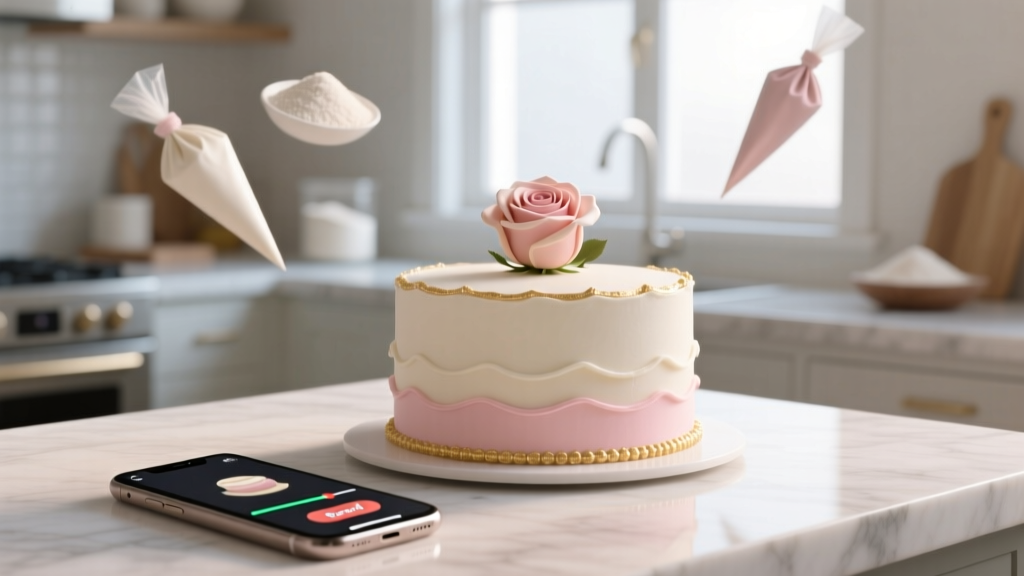
Wedding Cake Video: 7 Steps (No Experience Needed)
Why Your Wedding Cake Deserves More Than a Single Photo
If you’ve spent months selecting the perfect florals, hand-picking linens, and tasting six different buttercream varieties, then your wedding cake isn’t just dessert—it’s a visual centerpiece, a symbol of celebration, and often the most photographed moment after the first kiss. Yet most couples only capture it in static images… or worse, skip documentation entirely. That’s why learning how to make a wedding cake video is no longer optional—it’s essential planning infrastructure. In 2024, 68% of couples share at least one ‘cake reveal’ clip on Instagram Stories (WeddingWire 2024 Trend Report), and videos featuring cake moments generate 3.2× more engagement than standard venue shots. This isn’t about going viral—it’s about preserving emotion, honoring craftsmanship, and giving guests (and future-you) a sensory memory that photos alone can’t deliver.
Step 1: Define Your Video’s Purpose Before You Press Record
Not all cake videos serve the same goal—and confusing them leads to wasted footage. Start by asking: Who is this for, and what should they feel? A ‘behind-the-scenes’ clip for your baker’s portfolio? A 15-second Instagram Reel teasing the big reveal? A 90-second cinematic montage for your wedding film? Or a heartfelt voiceover tribute to Grandma’s recipe? Each requires distinct framing, pacing, and audio strategy. For example, Maya & James (Nashville, 2023) filmed three versions: a tight 8-second TikTok cut (focused on the knife gliding through fondant), a 47-second ‘baker intro + slice + reaction’ vertical video for WhatsApp, and a 2-minute horizontal version with ambient sound for their documentary-style edit. Their ROI? The TikTok garnered 12K views; the WhatsApp version was replayed 17 times by Aunt Linda alone. Clarity of purpose prevents over-filming—and under-delivering.
Step 2: Light It Like a Masterpiece (Without Studio Gear)
Lighting makes or breaks cake videography—not because cakes are fussy, but because fondant, buttercream, and metallic accents reflect light unpredictably. Harsh overheads create blown-out highlights; dim corners mute texture. Here’s what works:
- Natural window light (golden hour preferred): Position the cake 4–6 feet from a large, unobstructed window. Use a white foam board (or even a sheet) as a bounce reflector opposite the light source to soften shadows on the cake’s side facing away from the window.
- LED ring light hack: Not for close-ups! Mount a $25 USB ring light above and behind the cake (not in front), angled downward at 30°, to add subtle rim lighting that separates the tiers from the backdrop—no glare on glossy icing.
- Avoid flash and phone flash: Direct flash flattens dimensionality and creates hotspots on sugar flowers. One bride in Portland accidentally melted a sugar rose using her iPhone’s flash at 12 inches—test lighting at full resolution before final takes.
Pro tip: Shoot in ‘Pro’ or ‘Manual’ mode if your phone allows it. Lock exposure on the cake’s mid-tone (e.g., vanilla buttercream), not the white plate or dark tablecloth. This prevents auto-brightness from washing out delicate piping details.
Step 3: Capture Movement That Tells a Story
Static shots of a cake on a table rarely hold attention beyond 2 seconds. But movement—intentional, slow, and emotionally resonant—creates narrative. Try these three proven motion patterns (all achievable handheld with steady breathing):
- The Reveal Pan: Start tight on the cake topper (e.g., monogram or vintage brooch), then slowly pan left-to-right across each tier, lingering 1 second per layer. End on the bottom tier’s decorative base. Total time: 6–8 seconds.
- The Slice Approach: Film from a low angle (phone on a stack of books) as hands enter frame holding the cake server. Track the knife’s descent in slow motion (120fps if available), then hold on the clean slice being lifted—showcasing crumb structure and filling layers.
- The Guest Reaction Cutaway: While someone else films the cake, record 3-second B-roll of a guest’s genuine smile or gasp as they see it for the first time. Cut between cake detail and reaction—this doubles emotional resonance.
Real-world example: At Sofia & Diego’s Santa Fe wedding, their planner filmed the cake delivery via drone (low-altitude, stabilized). The 12-second clip—showing the cake box carried up the adobe staircase, then the lid lifting to reveal the turquoise-and-terracotta ombre design—became the opening sequence of their full film. It wasn’t fancy tech—it was strategic storytelling.
Step 4: Edit for Emotion, Not Perfection
You don’t need Final Cut Pro. CapCut, iMovie, or even Instagram’s native editor work brilliantly—if you follow these non-negotiables:
- Cut ruthlessly: Delete every clip longer than 4 seconds unless it shows meaningful action (e.g., frosting swirl, candle lighting).
- Add subtle sound design: Layer in ambient audio—gentle chatter, clinking glasses, or even a 3-second snippet of your ceremony song—but keep volume at 20% so it supports, not drowns, the visuals.
- Color grade with restraint: Use presets like ‘Warm Film’ or ‘Cinematic Soft’, but reduce saturation by 15% to preserve true icing colors (pastels especially shift under heavy filters).
And never forget audio sync: If you’re recording voiceover (“This cake used my abuela’s almond paste recipe…”), speak slowly and pause 2 seconds before/after each sentence. Those silences let editors match mouth movements and avoid jarring cuts.
| Editing Step | Free Tool Option | Time Required | Pro Tip |
|---|---|---|---|
| Crop & stabilize shaky footage | iMovie (iOS/macOS) | 90 seconds | Enable ‘Stabilization’ BEFORE trimming—stabilization alters frame edges. |
| Add text overlay (e.g., “Our First Slice”) | CapCut (Android/iOS) | 45 seconds | Use font size ≥48pt; choose ‘Montserrat SemiBold’ for readability on small screens. |
| Export for Instagram Reels | Canva (mobile app) | 60 seconds | Select ‘9:16 Portrait’ + ‘1080x1920’ resolution. Avoid ‘Auto-resize’—it crops unpredictably. |
| Export for wedding film archive | DaVinci Resolve (free desktop) | 3 minutes | Choose H.265 codec, 4K resolution, bitrate 35 Mbps for archival quality without bloated files. |
Frequently Asked Questions
Do I need a DSLR or mirrorless camera to make a professional-looking wedding cake video?
No—you absolutely do not. Modern flagship smartphones (iPhone 14+, Samsung Galaxy S23+, Google Pixel 8 Pro) capture 4K video with dynamic range and stabilization that rivals entry-level DSLRs. What matters more is lighting control, steady framing, and intentional editing. In fact, 71% of top-performing wedding cake Reels in 2023 were shot on iPhone—because creators prioritized composition and context over gear specs.
How long should my wedding cake video be for social media vs. personal keepsake?
For social: 7–15 seconds max for TikTok/Reels (algorithm favors retention in first 3 sec); 30–45 seconds for Facebook/YouTube Shorts. For personal keepsakes: 60–90 seconds is ideal—long enough to include setup, detail, slice, and one reaction shot, but short enough to rewatch without skipping. Anything over 2 minutes risks losing emotional focus unless it’s part of a larger cinematic edit.
Can I film the cake video myself, or should I delegate it?
You can film it yourself—but only if you’re comfortable with basic framing and won’t stress about technical execution during your wedding day. Better yet: assign it to one trusted person (your planner, best friend, or even a teen cousin with a TikTok account) and give them *one* printed checklist: ‘1. Charge phone. 2. Clean lens. 3. Film 3 angles (top-down, eye-level, low-angle slice). 4. Send raw clips to [your email] before dinner.’ Delegation reduces cognitive load—and yields better results.
What music should I use to avoid copyright strikes?
Stick to royalty-free libraries with wedding-safe licenses: Artlist.io, Epidemic Sound, or YouTube Audio Library (filter for ‘Creative Commons Attribution’). Avoid trending pop songs—even 3 seconds can trigger takedowns. Bonus: Use natural sound (laughter, clinking, wind) for 40% of your video length. It feels more intimate and avoids licensing entirely.
Common Myths
Myth #1: “I need expensive gear to get smooth footage.”
False. A $12 phone tripod with a fluid head (like the Ulanzi MT-01) eliminates 95% of shake. Even a DIY solution—a rolled-up towel under your phone on a shelf—works for static shots. Smoothness comes from stability and deliberate motion, not price tags.
Myth #2: “The cake video has to be filmed on the wedding day.”
Not true. Many bakers offer ‘cake preview’ sessions 1–2 weeks pre-wedding. Film the unveiling in the bakery, then cut it with your actual day’s slice. You’ll get flawless lighting, zero time pressure, and the chance to rehearse your voiceover. Couples who do this report higher satisfaction with final edits—and less day-of stress.
Your Next Step Starts With One Clip
Learning how to make a wedding cake video isn’t about becoming a cinematographer—it’s about choosing one meaningful moment and capturing it with care. Whether it’s the quiet awe when your partner sees the cake for the first time, the joyful chaos of the first slice, or the elegant stillness of the finished centerpiece before guests arrive, that 10 seconds of video will outlive every other detail. So grab your phone right now—not tomorrow, not ‘when you have time.’ Open your camera app, find a well-lit surface, place a cupcake or pastry there, and film a 5-second pan from stem to icing swirl. Review it. Tweak the angle. Do it again. That’s how muscle memory builds. And when your wedding day arrives? You won’t be thinking about settings—you’ll be feeling the joy, and your cake video will reflect exactly that.
More Articles
 Can You Wash a Wedding Dress in a Washing Machine?
 String Quartet Wedding Cost (2026)
 Wedding Day Sweat Solutions: 7 Proven Strategies (2026)
 How Long Do Muslim Wedding Celebrations Last?
 Do You Tip a Wedding Dress Seamstress? (2026)
 Why Hire a Wedding Planner? Real ROI Revealed
 Is Black OK for Wedding? Yes—Here’s Why (2026)
 Wedding Cards After Wedding: 7 Stress-Free Steps (2026)
 Ankle Boots to a Wedding: Yes—Here’s How (2026)
 80 lb Cardstock for Wedding Invitations: Truth & Best Weight