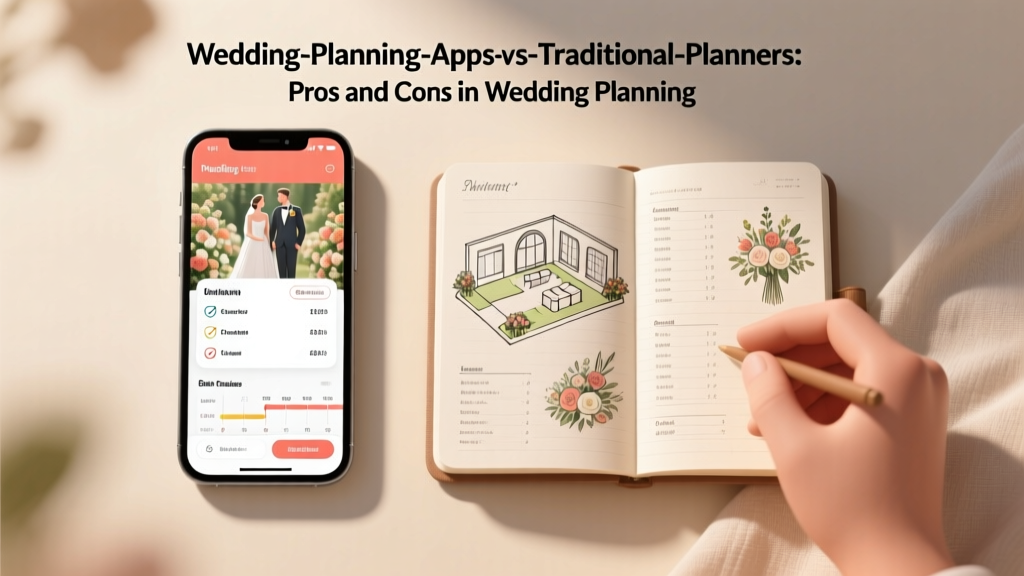
Wedding Planning Apps vs Traditional Planners Pros and Cons
You’re engaged—cue the happy tears, the screenshots of inspiration, and the sudden realization that a wedding involves approximately one thousand decisions. Even couples who are incredibly organized can feel overwhelmed once the guest list, budget, and family opinions start stacking up.
If you’re trying to figure out whether you should plan your wedding with a wedding planning app, hire a traditional wedding planner, or combine both, you’re in good company. This choice isn’t just about convenience—it affects your budget, your time, and how calm you feel as the big day gets closer.
Here’s a supportive, real-world guide to help you choose the planning approach that fits your personality, schedule, and wedding vision—without sacrificing your sanity.
Quick Overview: What Counts as a Wedding Planning App vs a Traditional Planner?
Wedding planning apps (and platforms) usually include:
- Budget trackers and expense categories
- Wedding checklists and timelines
- Guest list tools with RSVPs and meal choices
- Vendor directories and messaging
- Seating chart creators
- Design boards or inspiration galleries
Traditional wedding planners typically offer:
- Full-service planning: vendor sourcing, budget management, design, logistics
- Partial planning: help with specific areas like vendor booking or styling
- Month-of or day-of coordination: timeline creation, vendor confirmations, rehearsal, wedding-day management
Pros and Cons of Wedding Planning Apps
Pros: When apps shine
- Budget-friendly: Many are free or low-cost compared to hiring a pro planner.
- Always accessible: You can update your wedding checklist during a lunch break or while commuting.
- Great for organized couples: If you love spreadsheets and to-do lists, apps make it easy to stay on track.
- Useful for communication: Managing RSVPs, collecting addresses, and tracking meal selections can be smoother.
- Fast comparison-shopping: Vendor search tools can help you build a shortlist quickly.
Cons: Where apps can fall short
- No real-time human judgment: An app won’t tell you your timeline is unrealistic or that your florist quote is missing key items.
- Decision overload: Endless options can keep you in “research mode” instead of making bookings.
- Generic advice: Apps can’t fully account for your venue’s quirks, family dynamics, or cultural traditions.
- Logistics gaps: Tools help you list tasks; they don’t execute them or negotiate on your behalf.
- Tech fatigue: When you’ve stared at seating chart software for two hours, you may miss having a calm expert to step in.
Real-world scenario: App-only planning
Jordan and Sam are planning a 70-guest restaurant wedding and both work fairly predictable schedules. They use an app for:
- Guest list + RSVPs
- Budget tracking
- Timeline checklist
It works beautifully—until the week-of, when vendor arrival times change and the restaurant has questions about décor setup. They realize an app can’t run a rehearsal or manage last-minute logistics. They end up asking a friend to “coordinate,” which adds stress for everyone.
Pros and Cons of Hiring a Traditional Wedding Planner
Pros: What you’re really paying for
- Expert guidance: A planner helps you prioritize spending, avoid common pitfalls, and create a realistic plan.
- Time savings: They vet vendors, schedule calls, compare contracts, and keep decisions moving forward.
- Problem-solving: When it rains, a vendor cancels, or a timeline runs late, a planner pivots—calmly.
- Vendor relationships: Planners often know who is reliable, who communicates well, and who fits your style.
- Wedding day management: Your planner runs the schedule so you can be present, not managing a clipboard.
Cons: The trade-offs
- Cost: Full-service wedding planning is a major line item in your wedding budget.
- Less DIY control: The best planners collaborate, but you may still feel like you’re sharing the steering wheel.
- Finding the right match takes work: Personality fit matters. A mismatch can create more stress, not less.
- Availability: In-demand planners book up early (especially for peak-season Saturdays).
Real-world scenario: Full-service planner success
Maya and Chris are planning a 180-guest wedding at a venue that requires outside rentals and a tent. They both travel for work and can’t respond quickly during the day. Their planner:
- Builds a comprehensive wedding budget and payment schedule
- Creates a vendor team that fits their design vision
- Manages rental orders, delivery timing, and rain plans
- Runs the rehearsal and wedding-day timeline
For them, the planner isn’t a luxury—it’s how the wedding becomes possible without burning out.
Budget Considerations: What Each Option Really Costs
Wedding planning apps
- Cost range: Free to modest monthly fees; sometimes upgrades for premium features.
- Hidden costs: Time. If an app saves money but adds hours of research and coordination, that’s a real “cost” too.
Traditional wedding planners
- Cost range: Varies widely by region, experience, and service level (full-service vs month-of coordination).
- Where planners can save you money:
-
- Preventing costly contract mistakes
- Helping you avoid over-ordering rentals or florals
- Guiding you to spend on what guests notice (and cut what they don’t)
A helpful rule of thumb
If your wedding includes multiple locations, extensive décor, complicated logistics, or a large guest count, professional planning support often pays for itself in stress reduction alone. If your wedding is simple, well-packaged (like an all-inclusive venue), and you have time to manage details, an app can work well.
Timeline Advice: When to Use Apps, When to Bring in a Planner
12+ months out
- Apps are great for: building your wedding checklist, drafting a guest list, and sketching a starter budget.
- Planner is helpful for: choosing a venue, setting priorities, and building a vendor strategy (especially for high-demand dates).
6–12 months out
- Apps are great for: tracking deposits, collecting guest addresses, and managing vendor contacts.
- Planner is helpful for: reviewing contracts, building a day-of timeline structure, and designing logistics (layout, flow, rain plan).
0–6 months out
- Apps are great for: seating chart drafts, RSVP follow-ups, and final payments tracking.
- Planner is most valuable for: confirming vendor schedules, managing changes, coordinating deliveries, and running the wedding day.
The Best of Both Worlds: A Hybrid Planning Approach
Many couples find the sweetest spot is using a wedding planning app for organization and a coordinator or planner for execution. You get the structure of digital tools and the calm expertise of a human who can troubleshoot.
Hybrid options that work well
- App + month-of coordinator: You plan and book vendors; your coordinator runs the final timeline and wedding day.
- App + partial planner: You handle guest list and basic research; your planner helps with vendor selection, contracts, and design.
- Planner + app: Even with a full-service planner, using an app can keep your shared info (guest list, budget categories, tasks) tidy.
Step-by-Step: How to Decide What’s Right for You
-
Clarify your wedding complexity.
- One venue and an all-inclusive package? Apps may be enough.
- Multiple locations, tenting, cultural ceremonies, or lots of vendors? Consider professional planning support.
-
Look honestly at your time and energy.
- If your weeks are packed, planning can drag on and become stressful.
- If you have flexible evenings/weekends and enjoy logistics, an app can be empowering.
-
Set your stress threshold.
- Do you want to be the project manager on wedding week?
- If not, a month-of coordinator is often the best investment.
-
Decide what you want to DIY vs delegate.
- DIY-friendly: invitations, playlists for smaller weddings, favors, guest list tracking.
- Delegate-worthy: timeline management, vendor confirmations, ceremony flow, setup/teardown supervision.
-
Price out your options using your actual budget.
- Get at least 2–3 planner quotes for the service level you want.
- Compare that cost to what you’d spend in time and potential mistakes.
Checklist: If You Use a Wedding Planning App, Don’t Skip These Tasks
- Create a master wedding timeline (not just a checklist). Include deadlines for attire, stationery, final headcount, and seating chart.
- Confirm who is in charge on the wedding day. If you don’t hire a coordinator, assign a trusted point person.
- Build a vendor contact sheet with names, phone numbers, arrival times, and backup contacts.
- Review every vendor contract carefully. Watch for overtime fees, cancellation terms, and what’s included.
- Plan logistics:
- Load-in/load-out times
- Parking and directions
- Rain plan (even if you “don’t need one”)
- Who brings what (marriage license, rings, tips, décor items)
- Finalize a day-of schedule that includes buffer time (hair/makeup always runs long).
Common Mistakes Couples Make (and How to Avoid Them)
Mistake 1: Assuming an app replaces a coordinator
An app tracks tasks; it doesn’t run your rehearsal, direct vendor arrivals, or fix a seating chart crisis when Aunt Linda refuses her table. If you’re not hiring a planner, consider at least day-of coordination or designate a capable non-guest to manage logistics.
Mistake 2: Booking vendors without a cohesive timeline
Couples often book a photographer and HMUA without thinking through ceremony time, travel time, sunset timing, or family photo needs. Build a rough day-of timeline before signing contracts so coverage hours match reality.
Mistake 3: Underestimating “setup and teardown”
DIY décor looks beautiful—until you realize someone has to place 25 centerpieces, light candles, move ceremony chairs, and pack it all up at the end. If you’re DIY-heavy, budget for help (planner, coordinator, venue staff, or hired setup crew).
Mistake 4: Letting budget tracking get too vague
Apps make it easy to categorize spending, but you still need detail. Separate line items like:
- Florals (personal flowers vs reception arrangements)
- Rentals (tables/chairs vs linens vs tabletop items)
- Stationery (save-the-dates, invites, day-of signage)
- Attire (alterations, accessories, cleaning)
Pro Tips from Wedding Planners (Even If You Don’t Hire One)
- Build buffer time into everything. Add 10–15 minutes between major moments (especially before the ceremony and during photos).
- Ask vendors “What’s missing from this quote?” Great for catering service fees, rentals, delivery, setup, and overtime.
- Create a decision deadline. Example: “We pick linens by March 15.” Apps keep you organized, but deadlines keep you moving.
- Use a single source of truth. Whether it’s your app or a shared spreadsheet, avoid having multiple versions of guest lists and budgets floating around.
- Protect your wedding week. Aim to finish signage, seating chart, and final confirmations at least 5–7 days before the wedding.
FAQ: Wedding Planning Apps vs Traditional Planners
Are wedding planning apps actually accurate for budgets?
They’re great for tracking what you enter, but they can’t always predict region-specific pricing, service fees, taxes, gratuities, and rental needs. Use an app for organization, and double-check real quotes early so your wedding budget reflects reality.
Do I still need a day-of coordinator if I’m using an app?
If you want to enjoy your wedding day and not troubleshoot vendor timing, set-up questions, or family logistics, yes—day-of or month-of coordination is often worth it. An app won’t manage moving parts in real time.
When should we hire a wedding planner?
As early as you can once you have a date range and budget direction—especially if you’re planning a peak-season wedding. Many planners help most with venue selection and vendor booking, which happen early in the planning timeline.
What if we’re planning a small wedding or micro-wedding?
Apps can be perfect for micro-weddings, especially at an all-inclusive venue or restaurant. Still, consider coordination support if you have multiple vendors, DIY décor, or a tight schedule with transitions.
Can a planner work with the app we’re already using?
Often, yes. Many planners will use your tools (or share their own). At the first call, ask how they handle guest lists, timelines, and budget tracking so your systems align.
What’s the biggest sign we need more support?
If planning conversations are mostly stress, if tasks keep slipping, or if you’re avoiding decisions because they feel too big, it’s time to bring in help—either a partial planner or month-of coordinator.
Your Next Steps: Choose the Planning Support That Matches Your Life
- If you’re organized and your wedding is straightforward: Start with a wedding planning app, build a clear timeline, and consider adding month-of coordination for peace of mind.
- If you’re busy, overwhelmed, or planning something complex: Schedule calls with a few wedding planners and compare service levels (partial vs full-service).
- If you’re unsure: Try a hybrid approach—use an app now, then hire a coordinator once vendors are booked and the day-of logistics come into view.
You don’t need to plan the “perfect” way—you need a system that supports your relationship, your budget, and your peace of mind. The right choice is the one that helps you feel excited when you think about your wedding day, not exhausted.
Want more practical planning help? Explore more wedding planning guides, timelines, and budgeting tips on weddingsift.com.
More Articles
 Watch My Big Fat Greek Wedding 1 (2026)
 Groom's Family Wedding Costs (2026)
 Four Seasons Wedding Cost Breakdown (2026)
 How Much Is a Drive Thru Wedding in Vegas? (2026)
 Black to Fall Wedding? 2026 Etiquette Rules
 Japanese Wedding Money: Exact Amounts by Relationship (2026)
 Casual Wedding Attire for Men: Stress-Free Guide
 Marriage License Before Wedding: Rules & Deadlines
 Wedding Guest Seating: Stress-Free 7-Step Blueprint (2026)
 Box Braids for Weddings: 7 Frizz-Free, Photo-Ready Looks